Earbuds connected but no sound
Wireless earbuds on a PC almost always follow the Bluetooth tree (Stereo vs Hands-Free). Wired earbuds follow the jack path. Identify which you have, then apply the matching steps.
First cut
Most PC earbuds are Bluetooth. Treat “buds connected but no sound” like the Bluetooth tree first (Stereo vs Hands-Free). True wired earbuds use the wired jack path.
Step 1 — Identify wired buds vs wireless buds
- Wireless / case-charging buds — Settings → Bluetooth & devices → Connected → continue below and on Bluetooth.
- 3.5mm wired earbuds — Jump to wired; skip Bluetooth steps.
- USB-C dongle earbuds on a desktop — Check Sound output list for a new USB audio device; set it as Default (default output).
Step 2 — Wireless buds: Stereo default and both buds
- Wear both buds; many sets stay in call-only mode on one bud.
- In Sound output, select the stereo headphones entry — not Hands-Free AG Audio.
- Disable Spatial sound; check Volume Mixer for the browser/player.
- Forget device → reset buds (OEM button/charge-case combo) → pair again.
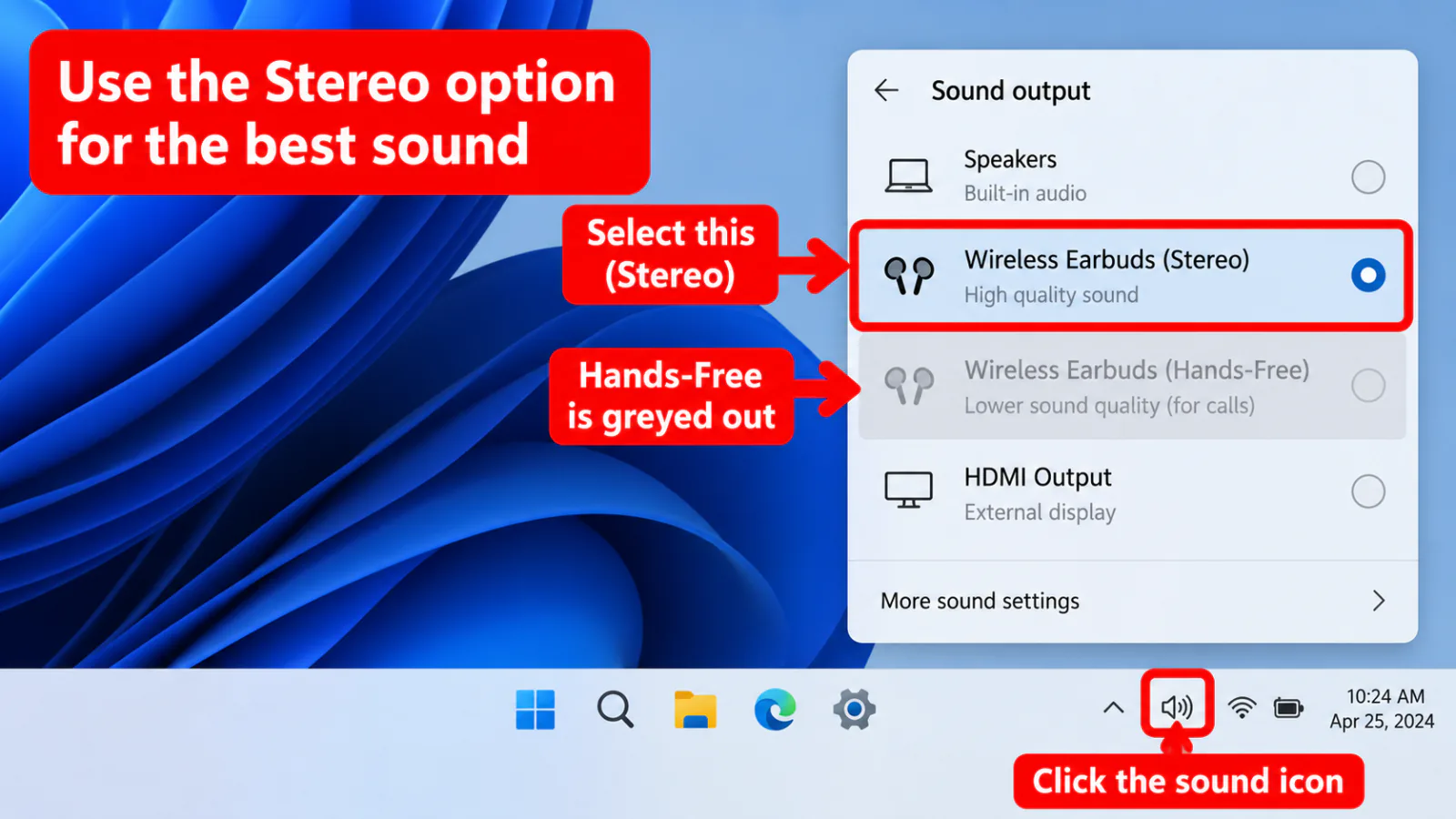
Step 3 — Apps, exclusive mode, drivers
- One app silent → Volume Mixer and the app’s own output picker.
- Game or DAW grabbed the device → exclusive mode.
- Still flat meter → Bluetooth/audio drivers and troubleshooters.
Full Bluetooth guide
→ Bluetooth
→ Bluetooth
Windows 11 UI
→ Windows 11
→ Windows 11
After update
→ after update
→ after update
Home
→ decision tree
→ decision tree
FAQ
Earbuds connected but no sound on Windows 11
Select the stereo output, set Spatial Off, re-pair, then run Bluetooth + Playing Audio troubleshooters. See Windows 11 for Settings paths.
Only the left or right bud has sound
Reset the buds, re-pair, and confirm the stereo device (not Hands-Free). Hardware mono failure is possible if every PC behaves the same.
AirPods on Windows PC
Windows can connect AirPods over Bluetooth with the same Stereo vs Hands-Free caveat. No separate AirPods page — follow this earbuds + Bluetooth tree.
Official / primary sources
Symptom map
- Headphones connected but no sound (start here)
- Bluetooth / wireless headphones — connected, no audio
- Wired / 3.5mm jack — plugged in, no audio
- Earbuds / buds connected but no sound
- Wrong default playback or communication device
- Exclusive mode / one app capturing the device
- Spatial sound / Windows Sonic issues
- Audio, Realtek, or Bluetooth driver problems
- Volume Mixer — app muted or communications ducking
- Windows 11 Settings paths for this symptom
- No sound after a Windows Update
- Windows audio & Bluetooth troubleshooters