Windows 11 specific paths
Same fixes as Windows 10, with Win11 Settings labels. Start at System → Sound and Bluetooth & devices, then use mmsys.cpl for exclusive mode and communication defaults.
First cut
Windows 11 still uses the same audio stack as Windows 10, but most clicks live under Settings → System → Sound and Bluetooth & devices. Use this page for exact Win11 paths when headphones are connected but silent.
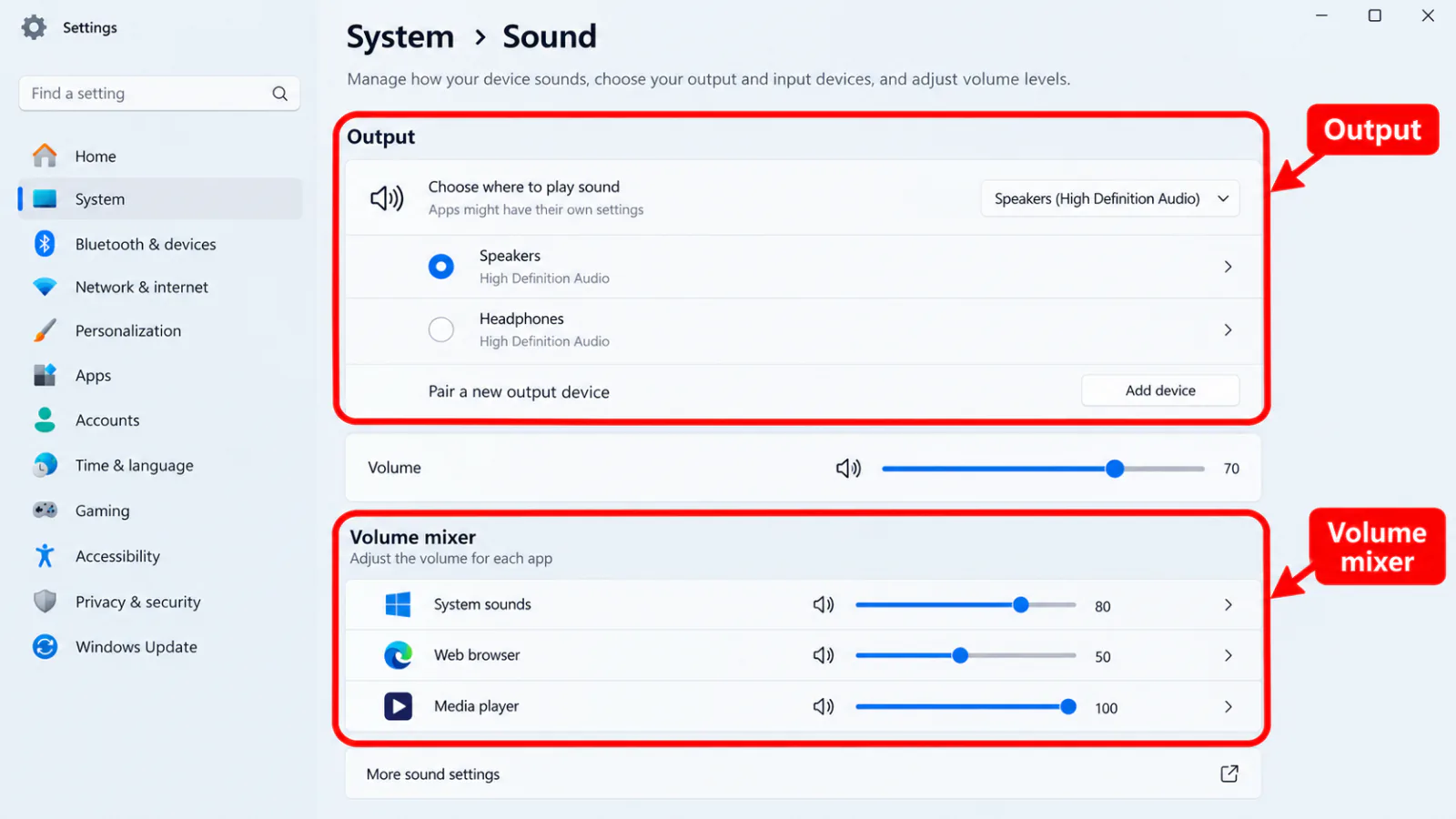
Step 1 — Sound output on Windows 11
- Settings → System → Sound.
- Under Output, select your headphones; raise volume; open the device properties link.
- Set Spatial sound to Off; verify Format is a standard rate (for example 24-bit 48000 Hz).
- Use Volume mixer on the same page for per-app mute/output.
Step 2 — Bluetooth & devices on Windows 11
- Settings → Bluetooth & devices → view the headset → Connected.
- Remove device and re-pair if needed; use More devices settings for classic options.
- Still open
mmsys.cplwhen you need Default Communication Device, exclusive mode, or enhancements — those remain in the classic panel.
Step 3 — Troubleshoot from Get Help / Settings
- Settings → System → Sound → scroll to Troubleshoot / Related → run Playing Audio.
- Settings → System → Troubleshoot → Other troubleshooters → Playing Audio and Bluetooth.
- Full steps: troubleshooter.
Bluetooth detail
→ Bluetooth
→ Bluetooth
After a quality update
→ after update
→ after update
Drivers
→ drivers
→ drivers
Home
→ decision tree
→ decision tree
FAQ
My Bluetooth headset is connected but no sound on Windows 11
Choose the stereo output under Settings → System → Sound, set Spatial Off, confirm Volume mixer, then re-pair. See also Bluetooth.
Where did the old Sound control panel go?
It is still available via mmsys.cpl and is required for exclusive mode and some defaults.
Windows 10 vs 11 — different fix?
Same decision tree; only the Settings labels differ. Use this page for Win11 navigation.
Official / primary sources
Symptom map
- Headphones connected but no sound (start here)
- Bluetooth / wireless headphones — connected, no audio
- Wired / 3.5mm jack — plugged in, no audio
- Earbuds / buds connected but no sound
- Wrong default playback or communication device
- Exclusive mode / one app capturing the device
- Spatial sound / Windows Sonic issues
- Audio, Realtek, or Bluetooth driver problems
- Volume Mixer — app muted or communications ducking
- Windows 11 Settings paths for this symptom
- No sound after a Windows Update
- Windows audio & Bluetooth troubleshooters